 Match the Pose
About
Stretching and yoga that checks your form
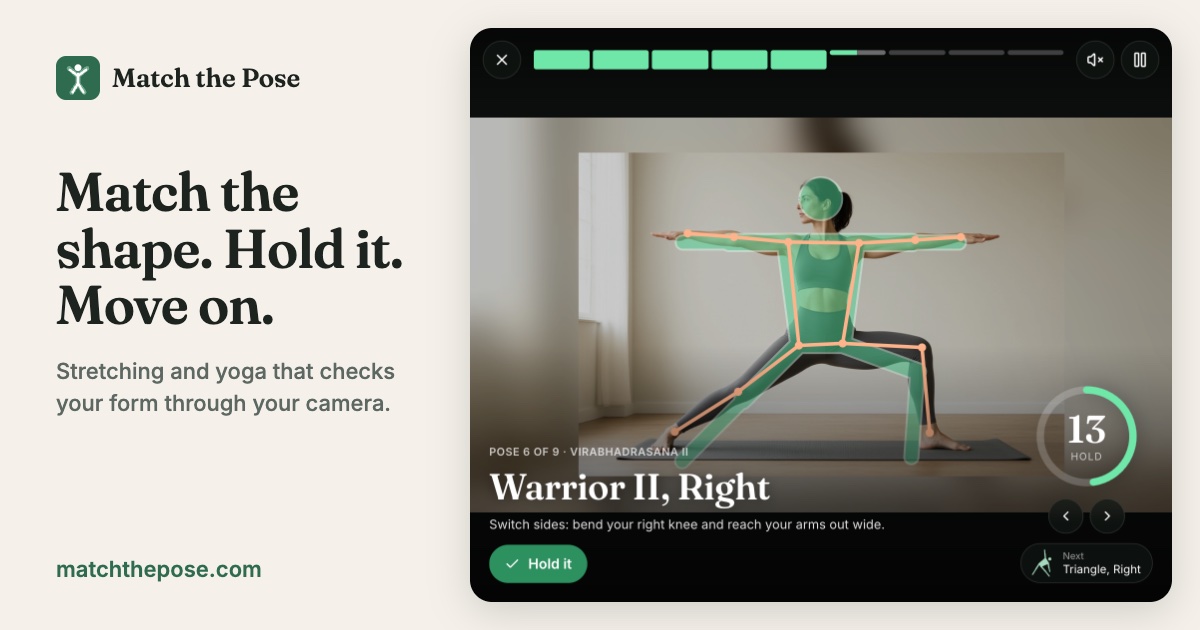
Match the Pose is a free guided stretching and yoga site. It uses your camera to see how you are standing, shows an outline of the pose you should be in, and moves to the next pose once you have held it for long enough.
Most follow-along videos keep going whether or not you got into the pose. This works the other way round: the timer only runs while your body actually matches the shape, so you can take as long as you need to find it, and you get told what to fix.
How to use it
- Set up. Prop your phone, tablet or laptop up and step back 2 to 3 meters (7 to 10 feet), so your whole body is in view from head to feet. For floor routines, put the device low.
- Pick a routine. Each one takes a few minutes. The first pose appears as soon as the camera can see all of you.
- Match the outline. A soft outline of the pose is drawn over the camera view, sized to your own body and anchored at your hips. Each limb turns green when it lines up.
- Hold it. Once everything is green, the ring counts down your hold. Slip out of the pose and it pauses rather than starting over. When it fills, you hear a chime and the next pose appears.
A voice reads out each pose and tells you what to adjust, such as "Raise your left arm" or "Lean your upper body to your right", so you don't need to look at the screen in a forward fold or downward dog.
The routines
- Morning Wake-Up: mountain, upward salute, side bends, forward fold, halfway lift and chair.
- Desk Break: star, cactus arms, side bends, a standing quad stretch on each leg and a forward fold. No mat needed.
- Standing Flow: Warrior II, triangle and goddess on both sides.
- Balance Builder: tree pose on each leg, chair and Warrior III.
- Floor Flow: child's pose, downward dog, plank, cobra and low lunges.
- Hips & Hamstrings: butterfly, seated forward fold, low lunges and child's pose.
How it works
The site runs Google's MediaPipe pose model in your browser. Many times a second, it finds 33 points on your body, such as your shoulders, elbows, wrists, hips, knees and ankles. Match the Pose turns those into the angle of your torso, upper arms, forearms, thighs and shins, and compares each one with the target pose. Using angles rather than positions means it works whatever your height and however far you stand from the camera.
The target poses were tuned by running the same model on photos of people doing each pose. For poses done side-on to the camera, you can face either way.
Questions
Is my camera video uploaded?
No. Pose tracking runs in your browser on your own device. The video is never uploaded, recorded or stored, and the site has no accounts.
Do I need to install an app?
No. It works in Safari, Chrome, Edge or Firefox on a phone, tablet or computer with a camera. A phone or laptop from the last few years runs it smoothly; on older devices, pick Fast tracking in the settings.
How exact do I need to be?
On the standard setting, each limb needs to be within about 20 degrees of the outline. Choose Gentle if you are a beginner or have tight muscles, or Strict for precise alignment. If you can't find a pose after a while, matching loosens a little, and you can always skip ahead.
Why can't it see me?
Your whole body needs to be in the frame, including your feet. Step back, make sure the room is well lit, and avoid very baggy clothes or a background the same color as your outfit.
Is this medical or physical therapy advice?
No. Match the Pose is a general fitness guide. Move within a comfortable range, stop if anything hurts, and check with a professional if you have an injury.
Ready to stretch?
Start a routine